// never run npm install on your machine again

Run code and devtools in a machine.

Reproducible, sandboxed Lima VMs for the Claude Code / Codex era. No host filesystem mount. No cross-project bleed. One machine up <project> away.

scroll

// section 01 — architecture

The machine room.

Your shell talks to the CLI. The CLI drives Lima. Lima boots a VM per project. Nothing crosses a line that isn't explicitly drawn.

// host (your mac) // hypervisor // guest vms host your machine macOS · arm64 $ shell ↓ machine cli ~/.ssh/agent forwarded, never copied control · ssh hypervisor Lima Apple Virtualization · vz • no host fs mount • tmpfs secrets boot · provision vm · wallet vm · scraper vm · blog ubuntu-24.04-arm64 running — isolation barrier —
agent-forwarded SSH
Your ssh-agent is forwarded into the guest at exec time. The key file never leaves the host.
tmpfs-only secrets
Secrets from 1Password land in $XDG_RUNTIME_DIR/dev-secrets, a tmpfs that's wiped at shutdown.
no host fs mount
Lima's default mountType is disabled. The VM can't read your ~/ or anything else.

// section 02 — why bother

Three things, in order of importance.

01

Isolated by default.

One VM per project. The blast radius of a bad postinstall script is one VM, not your laptop.

machine up blog
02

Reproducible from TOML.

Check projects.toml and provision.toml into the repo. Your teammate runs up, gets the same box.

machine rebuild blog
03

Agent-ready, on day one.

Claude Code, Codex, Aider, and friends ship in the base image. Point them at the SSH host and let them rip.

machine ssh blog

// section 03 — threat model

Ghost in the machine.

The point of a VM is the boundary. Here's exactly what crosses it and what doesn't. No vibes — the file path on the right is real.

what the VM can reach

  • Your project's git repo, cloned at bootgit@github.com:you/blog → ~/code/blog (inside the VM)
  • Your forwarded SSH agent socket$SSH_AUTH_SOCK · used, never copied
  • 1Password env(s) you declared in the repo's .envrc$XDG_RUNTIME_DIR/dev-secrets (tmpfs)
  • Outbound network, and a few forwarded localhost ports3000-3010 · 4200 · 5173-5180 · 8080-8099
  • Its own filesystem, fullydisposable. `machine rebuild` is cheap.

what the VM cannot reach

  • ×
    Your dotfiles, shells, history~/.bash_history · ~/.config · ~/.aws
  • ×
    Anything else in your home directory~/Documents · ~/Desktop · ~/Library
  • ×
    Other projects' VMs, files, or socketsno shared volumes, no cross-VM ssh
  • ×
    Your 1Password vault directlyonly items you allow-list
  • ×
    The host disk, the keychain, Touch IDif it's on macOS, it stays on macOS

// section 04 — profiles

The machine shop.

Profiles stack. Pick a base, layer extras in provision.toml, or write your own from scratch in 30 lines.

cypress

Chrome (or Chromium on arm64), Xvfb, and the lib deps Cypress needs. Node lands from the base image.

chromechromiumxvfbgtk · nss
supabase-fly

The two CLIs you actually use when shipping a backend. Docker comes from the base image.

supabaseflyctl
π
python

Modern Python tooling on top of system python3: uv for envs and installs, ruff for lint/format, pyright for types.

uvruffpyright
rust

rustup with the stable toolchain, installed system-wide so cargo is on PATH for every user.

rustupcargostable
go
go

A pinned Go toolchain from go.dev, dropped into /usr/local/go with go and gofmt on PATH.

go 1.23gofmt
+
your own

A profile is a TOML file and a shell script. Copy any of the above, change three lines, commit it.

provision.tomlsetup.sh

// section 05 — live

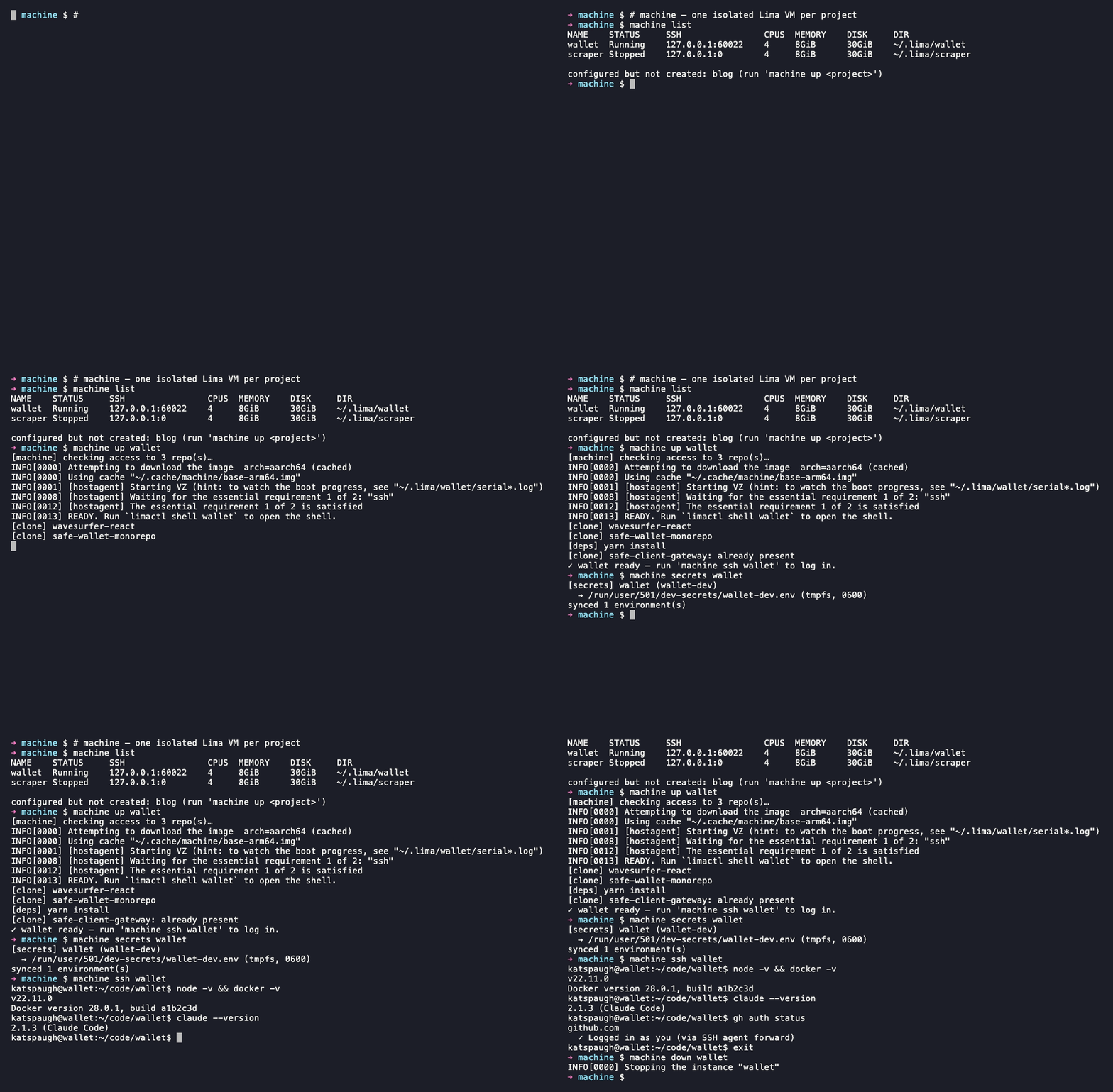
From nothing to a shell, in 38 seconds.

Recorded once, played back forever. The first up is the slow one — every subsequent boot is cached.

~/code/blog
00:00 / 00:38

// section 06 — lifecycle

Tend the machine.

Nine commands, no manifesto. Most days you'll use the first two.

machine up <p>
Boot the VM. First time provisions; after that it's a warm restart.
machine ssh <p>
Open an interactive shell. With your agent forwarded.
machine update <p>
Re-run provisioning on a running box. Tools change; the VM doesn't.
machine rebuild <p>
Tear the VM down to the image and provision from scratch.
machine destroy <p>
Rage-quit a machine. Disk, state, secrets, all gone.
machine doctor
Check Lima, network, agent, and disk space. Tells you what's drifted.
machine ps
List your VMs, their states, and where the SSH ports landed.
machine secrets <p>
Show which 1Password items resolve into /run/secrets for this project.
machine init
First run only. Writes a starter projects.toml to ~/.config/machine/.

// section 07 — editors

Your editor doesn't have to know it's a VM.

Visual Studio Code — Remote-SSH: connect to host…
Select configured SSH host or enter user@host
machine-blog lima · 22:60010
machine-wallet lima · 22:60011
machine-scraper lima · 22:60012
+ Add new SSH host…

machine up writes the host into ~/.ssh/config.d/machine. Cursor and JetBrains Gateway pick it up too.

Boot a machine.

Install from the Homebrew tap, run machine init, then machine up.

$
brew install katspaugh/machine/machine

Prefer to clone? git clone the repo — same code, dev mode. Read the formula or verify the release before installing.